Free · MP4 · No Login

Instagram Reels
Downloader
Online

Paste a public Instagram Reel link to download it as MP4 in the best available quality.
No login or app required.

Supports public Reel links: /reel/
Download Facebook Videos & Reels Download Pinterest Videos & Images
ReelDown Instagram Downloader

Free Instagram Reels Downloader — Save Public Reels as MP4

ReelDown is a browser-based Instagram Reels downloader for publicly accessible Reel links. Paste the Reel URL and save the available MP4 to iPhone, Android, Windows or Mac without creating a ReelDown account.

Need a regular Instagram video? Open Video Downloader →

How to Download Instagram Reels

Follow these three steps to save a publicly accessible Instagram Reel as an MP4 file.

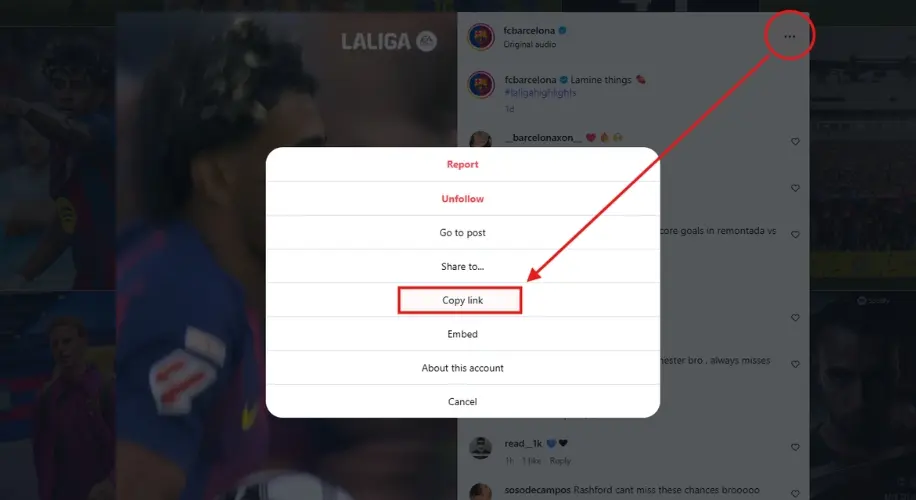
Copy link
01

Copy the Reel Link

Open the public Reel in Instagram, tap Share or the menu, and choose "Copy Link". On desktop, you can also copy the Reel URL from the browser address bar.

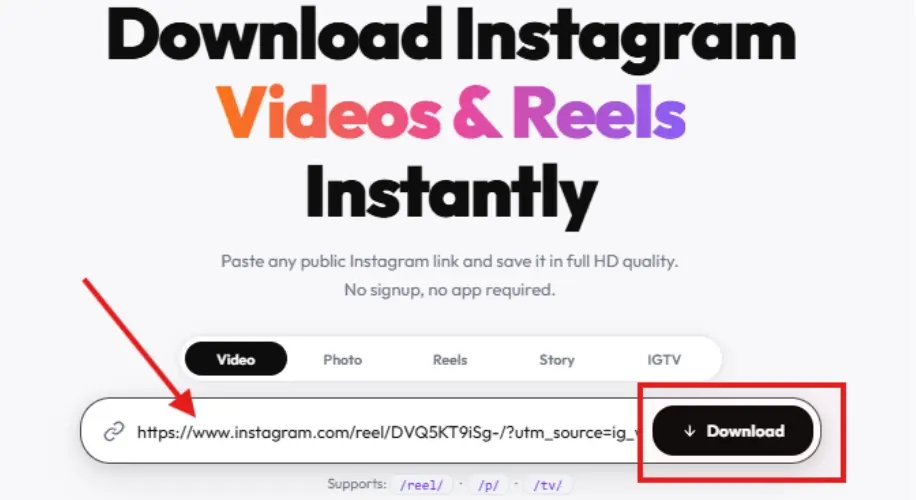
Paste link
02

Paste the Reel Link into ReelDown

Paste the copied Reel URL into the box above. You can use the Paste button on supported browsers or paste the link normally.

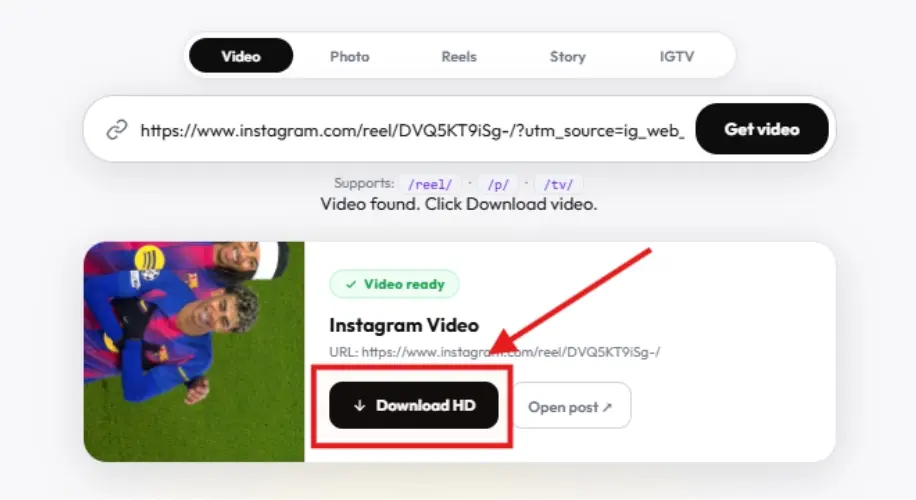
Download
03

Download the Reel as MP4

Choose the available download option to save the Reel as MP4. ReelDown uses the best media quality available from the source, and audio is kept when it is available with the Reel.

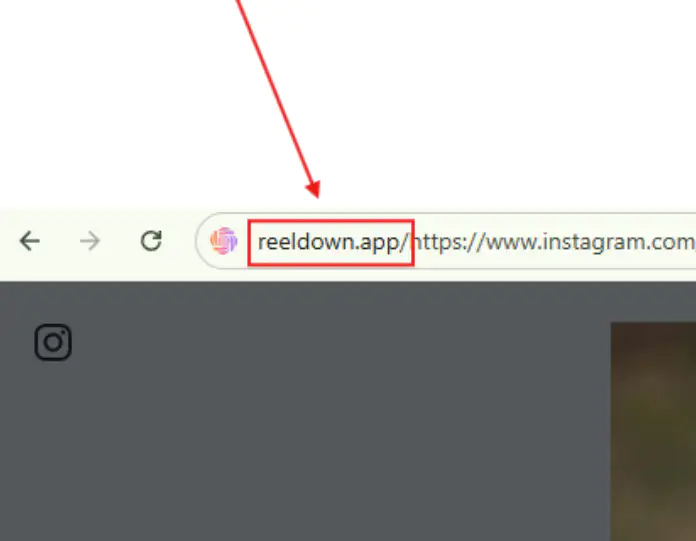
Download Instagram Reels from Your Address Bar

⚡ Pro Tip

You can also type reeldown.app/ before a public Instagram Reel URL in your browser address bar and press Enter. ReelDown will open with that Reel link ready to process.

Example: reeldown.app/https://www.instagram.com/reel/ABC123/

Works on iPhone, Android, Windows and Mac. No ReelDown account or app installation is required.

Address bar

Why Use ReelDown for Instagram Reels?

A focused web tool for saving publicly accessible Instagram Reels without installing an app.

Simple Reel Downloads

Copy a public Reel link, paste it into ReelDown, and use the available download option.

Works on Any Device

Use ReelDown from a modern browser on phones, tablets, laptops and desktop computers.

Best Available Quality

ReelDown requests the best available media for the public Reel. Actual resolution depends on the source.

No Login Required

You do not need to sign in to Instagram through ReelDown or create a ReelDown account.

Download Instagram Reels as MP4

Save publicly accessible Instagram Reels as MP4 files in the best quality available from the source.

Download Instagram Reels free MP4
Reels

Save Instagram Reels with Audio When Available

When the public Reel includes audio and that media is available from the source, ReelDown can save the Reel as an MP4 with its audio. Quality and availability depend on the original Reel.

⬆️ Paste a Reel link above

Download Faster with
ReelDown Chrome Extension

  • One-click downloads on Instagram
  • Supports photos, videos, reels, stories, carousels
  • Best available quality from original post
  • Lightweight, fast, and easy to use without sign-in
Get started now

ReelDown

Chrome Extension

Free browser extension

Browser-Based

Paste a public Reel URL and process it directly from your web browser.

🛡️

No Login Required

You do not need to sign in to Instagram through ReelDown or create a ReelDown account.

🎬

Best Available Quality

ReelDown uses the best available media returned for the public Reel; quality depends on the source.

📱

Any Device

Works perfectly on phones, tablets and desktops. No app needed.

Instagram Reels Downloader FAQ

Common questions about downloading publicly accessible Instagram Reels with ReelDown.

Yes. Paste a publicly accessible Instagram Reel URL into ReelDown and use the download option when the Reel is available.
If the source Reel includes audio and Instagram makes that media available, the downloaded MP4 can include the audio.
No. ReelDown works in a browser and does not require a ReelDown account or app installation.
No. ReelDown is designed for publicly accessible Reel URLs. Private, deleted or unavailable Reels cannot be fetched.
Reels are downloaded as MP4 video files when an MP4 source is available.
On desktop, the file usually goes to your Downloads folder. On mobile, the location depends on your browser and device settings, such as Downloads or the Files app.
Yes! ReelDown works on all devices including iPhone, iPad, Android phones and tablets, as well as Windows and Mac computers. No app installation needed — just open your mobile browser, paste the Instagram link, and download directly to your device.
ReelDown uses the best available video source returned for the public Reel. The exact resolution can vary from one Reel to another.
ReelDown does not add its own watermark or logo to the downloaded file. Any text, logo or watermark already present inside the original Reel remains part of the source video.