Free · Browser based

Instagram Story Downloader

Try downloading an available public Instagram Story using its direct link. Learn which Story links work and why expired or private Stories may fail.

Link format: /stories/username/numeric-id/
Download Facebook Videos & Reels Download Pinterest Videos & Images
ReelDown Instagram Downloader

Use a direct link to an available Story

This tool needs the individual Story URL, including the username and numeric Story ID. Story access can require authentication even when an account is public. It cannot recover expired or deleted Stories.

View supported links

How to use the instagram story downloader

Use a post you own or have permission to save.

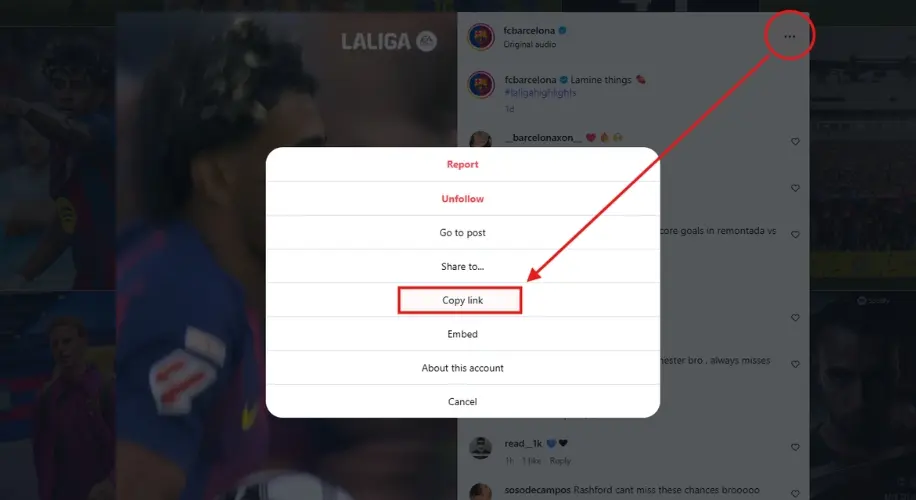
Copy link
01

Copy the individual Story link

Open the Story you have permission to save and copy its link. It should identify both the account and the Story, such as /stories/username/123456789/.

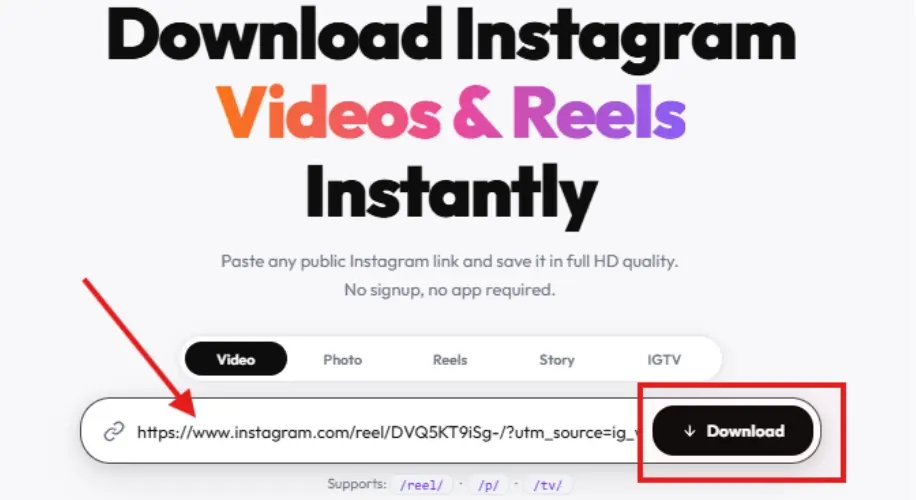
Paste link
02

Request the available Story

Paste that direct link above. A username alone, a profile link or a Highlights collection does not identify a supported Story request.

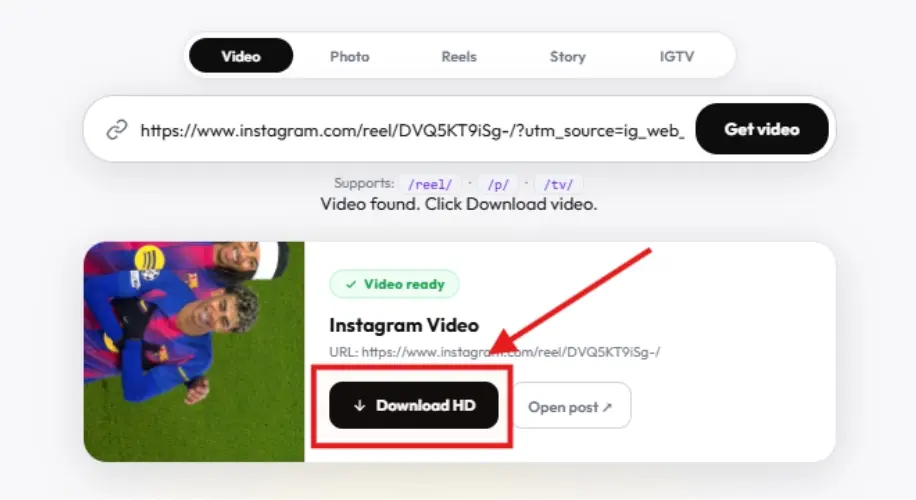
Download
03

Check the image or video result

If retrieval succeeds, review the preview and save the returned image or video. If it fails, check availability in Instagram; repeated retries cannot restore expired content.

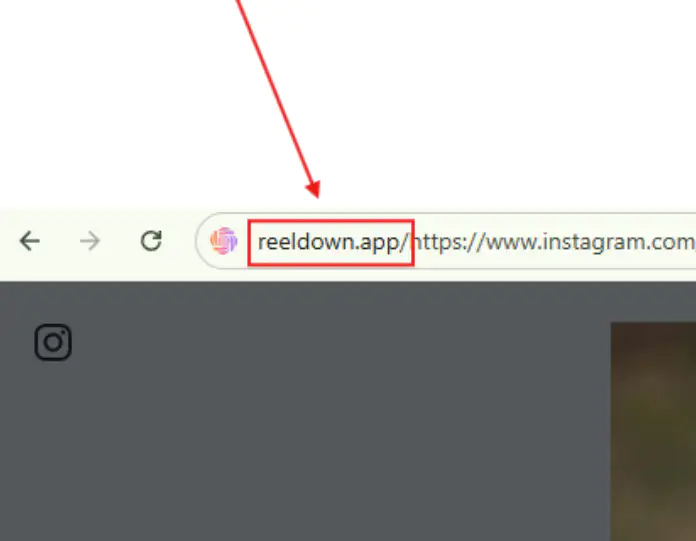
Open this downloader from the address bar

⚡ Pro Tip

The address-bar shortcut opens the downloader with your supported Instagram post link. Check the returned preview before saving a file.

Example: reeldown.app/https://www.instagram.com/reel/ABC123/

Use a supported public post link. Availability and download options depend on the source.

Address bar

What to expect from this downloader

Check the source result and choose where to save it.

Simple workflow

Paste a direct link and review the returned result.

Support for all devices

Whether on mobile, tablet, or desktop, ReelDown has got you covered.

Available source quality

Resolution depends on the media the source provides.

No Instagram password needed

Submit a post link; do not enter account credentials.

Instagram Story Downloader — Free, No Watermark

Save Instagram Stories before they disappear — photos and videos, no watermark, completely free.

Download Instagram Stories free
Story

Instagram Story Downloader — Save Before They Disappear

Instagram Stories vanish after 24 hours. ReelDown lets you save Instagram Stories — both photos and videos — instantly and for free. No login, no watermark.

⬇️ Download Instagram Stories free

Use the direct link to an available Story

Open the specific Story you want to save and copy its link. Story links commonly contain /stories/, an account name and a Story identifier. A profile link alone does not identify the Story to retrieve.

Why a Story download may fail

A Story may expire, be deleted or require access that the downloader does not have. ReelDown cannot restore an expired Story or bypass a private account. Even a Story you can view in your own logged-in browser may not be available through the media provider.

Photos and videos in Stories

A Story can contain an image or a video. Check the returned preview and save the available file. Downloading one Story link does not guarantee that every Story from that account will be included.

Save the correct content type

For a video published as a Reel, use the Reels downloader. For a regular photo post, use the photo downloader. These tools use post links rather than Story links.

Read the Instagram Story saving guide for more context. Only save or share content you own or have permission to use.

Download Faster with
ReelDown Chrome Extension

  • One-click downloads on Instagram
  • Supports photos, videos, reels, stories, carousels
  • Best available quality from original post
  • Lightweight, fast, and easy to use without sign-in
Get started now

ReelDown

Chrome Extension

Optional browser extension

Browser based

Use the downloader in your browser. Retrieval time varies with availability and connection speed.

🛡️

No account required

No Instagram login is required. See our privacy policy for data handling details.

🎬

Available quality

Quality depends on the media available from the source.

📱

Any Device

Use a browser on your phone, tablet or computer. Save locations vary by device.

Instagram Story Downloader FAQ

No. ReelDown does not provide an archive of expired or deleted Stories.
A public account does not guarantee anonymous Story access. The source may require login, block retrieval or no longer serve the specific Story.
No. Use the direct /stories/username/numeric-id/ URL for a particular available Story.
Highlights collections are not supported by the current extraction route. This page does not browse or download a profile’s Highlights.

Save the file on your device

iPhone and iPad · Android · PC and Mac

Check supported URL formats, how retrieval works or service checks and troubleshooting.

A regular post uses a different link format: see Photo or Video.